What Is WPF in C#? A Complete Guide to Windows Presentation Foundation
What is WPF in C#? A clear guide to Windows Presentation Foundation, how it works with C# and XAML, and whether it's worth learning in 2026.
On this page
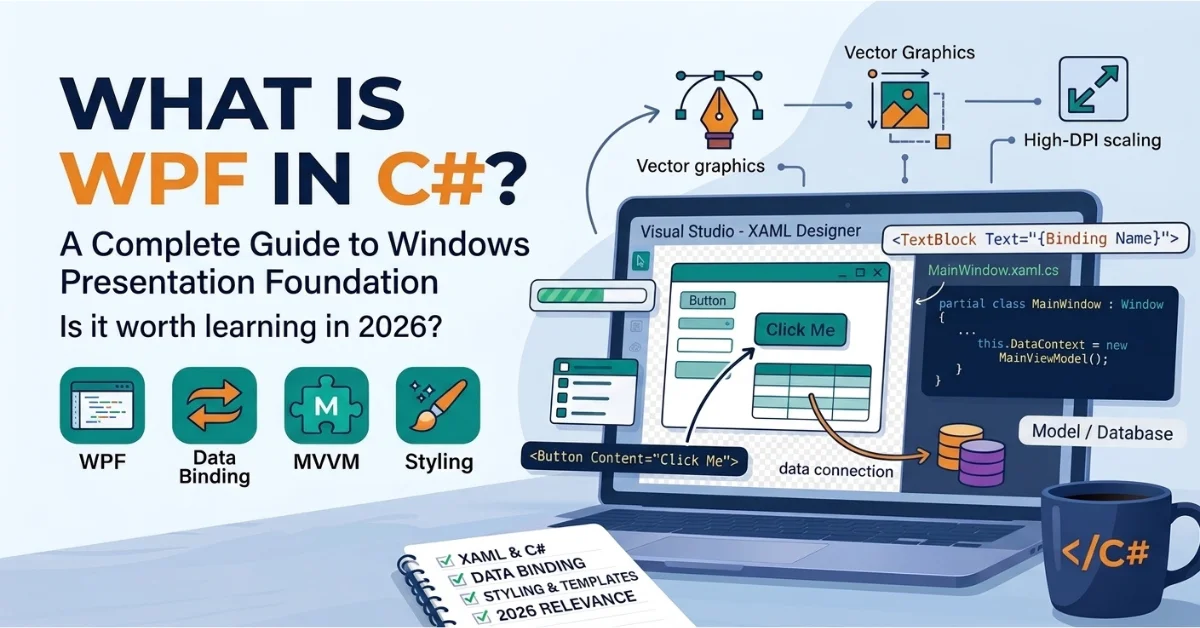
If you've searched what is WPF in C#, here's the short version: WPF (Windows Presentation Foundation) is a UI framework for building Windows desktop applications, and it's used together with C# to create everything from internal business tools to full data-entry systems. WPF handles how an app looks and lays out its screens, C# handles what happens when a user interacts with it, and .NET is the platform both of them run on.
That's the simple explanation, but the details matter once you're actually deciding whether to build something with it. This guide covers what WPF is, how it connects to C# and XAML, what it's good for, and whether it still makes sense to learn in 2026.
What Is WPF in C#?
WPF stands for Windows Presentation Foundation, and it's a UI framework, not a programming language. It doesn't compete with C# the way, say, Python or Java would; instead, it's a set of libraries you use from C# to build the visual part of a Windows app. WPF was designed specifically for desktop software that needs a flexible, custom-styled interface, things like line-of-business tools, dashboards, and data-heavy forms, rather than for web pages or mobile screens.
C# and WPF work together in a fairly simple division of labor: WPF supplies the controls, layout system, and rendering engine, while C# supplies the logic behind button clicks, calculations, and data handling. Neither one replaces the other.
Is WPF Part of C# or .NET?
C# is a programming language. .NET is the broader platform, including the runtime and shared libraries, that C# code runs on. WPF sits inside that picture as one specific UI framework built on top of .NET. According to Microsoft's own documentation, WPF is part of .NET, meaning a WPF project can use the same libraries and language features as any other .NET application, while C# remains the language you write that app's logic in.
What Does WPF Stand For?
WPF stands for Windows Presentation Foundation. The name is fairly literal: it's a "presentation" layer, meaning it's responsible for how an app looks and renders, and it's built specifically for Windows.
What Is WPF Used For?
WPF is best suited to Windows desktop software where the interface needs real structure and some visual polish, not just a quick form. Common, practical uses include:
Business applications
Enterprise software
Internal company tools
Data-entry applications
Dashboards
Financial or engineering applications
Custom Windows desktop interfaces
What Can You Build With WPF?
Anything that fits the Windows desktop mold benefits from WPF: order management systems, admin consoles, internal reporting tools, and desktop utilities that need a distinct, non-default look rather than the generic Windows Forms style.
What Can't WPF Be Used For?
WPF is Windows-only, so it's not a web UI framework and not a mobile UI framework. If a project needs to run in a browser or on iOS and Android, WPF isn't the right tool, no matter how the rest of the stack is built.
How Does WPF Work With C#?
The relationship breaks down into three simple roles:
XAML → describes the user interface
C# → handles application logic and behavior
WPF → the framework that connects the two
What Is XAML in WPF?
XAML (Extensible Application Markup Language) is a declarative, XML-based syntax used to lay out controls and set their properties. WPF uses XAML because it separates what the interface looks like from what the app actually does, which keeps layout readable and lets a XAML file be edited without touching C# logic at all.
What Is Code-Behind in WPF?
Many WPF .xaml files have a corresponding .xaml.cs code-behind file, where event handlers and UI-specific logic can be defined. The XAML describes the interface; the code-behind is a normal C# class that handles events and any logic tied to that specific window or control.
Simple WPF XAML and C# Example
xml
<!-- MainWindow.xaml -->
<Window x:Class="WpfDemo.MainWindow"
        xmlns="http://schemas.microsoft.com/winfx/2006/xaml/presentation"
        xmlns:x="http://schemas.microsoft.com/winfx/2006/xaml"
        Title="WPF Demo" Height="180" Width="280">
    <StackPanel Margin="20">
        <TextBlock x:Name="StatusText" Text="Waiting for click..." Margin="0,0,0,10" />
        <Button x:Name="ActionButton" Content="Click Me" Click="ActionButton_Click" />
    </StackPanel>
</Window>
csharp
// MainWindow.xaml.cs
using System.Windows;

namespace WpfDemo
{
    public partial class MainWindow : Window
    {
        public MainWindow()
        {
            InitializeComponent();
        }

        private void ActionButton_Click(object sender, RoutedEventArgs e)
        {
            StatusText.Text = "Button was clicked!";
        }
    }
}
The XAML declares a button and a text block. The code-behind reacts to the button's Click event and updates the text block. In this example, the XAML and code-behind work together: the XAML defines the interface, while the code-behind handles the button's behavior.
How Is a WPF Application Structured?
A default WPF project comes with a few standard pieces:
App.xaml: application-level startup and shared resources
MainWindow.xaml: the main window's interface
MainWindow.xaml.cs: the main window's code-behind
Project file (.csproj): declares the project as a WPF app
Resources: images, icons, and other static assets
How XAML, C#, and WPF Work Together
A typical interaction flows like this: a user clicks a button defined in XAML, WPF raises the Click event, the code-behind method in C# runs and updates a bound property or a control, and WPF re-renders whatever changed on screen. The user never sees the handoff between XAML and C#; it just looks like the app responded.
Key Features of WPF
XAML-Based UI
WPF uses XAML to declaratively describe the UI, while the build process compiles and prepares that markup for use when the application runs.
Data Binding
Data binding connects a UI property (the target) to a data property (the source), so changes in one can update the other automatically. The object a control uses as its default binding source is called its DataContext. A one-way binding only pushes updates from source to target (good for read-only display); a two-way binding keeps both directions in sync (used for anything a user edits, like a text box).
xml
<TextBox Text="{Binding Name, UpdateSourceTrigger=PropertyChanged}" />If Name is a property on the bound object that raises INotifyPropertyChanged, typing in the text box updates that object automatically, with no manual sync code required.
Dependency Properties
Dependency properties are a special property system that WPF uses for properties that need to support binding, styling, animation, or value inheritance, with their value tracked through a shared property store rather than a private field like an ordinary C# property. They matter because that shared storage is what lets WPF know where a property's current value is coming from, something an ordinary field-backed property can't do on its own.
Routed Events
Routed events can travel through the WPF element tree instead of staying confined to whatever control raised them. Bubbling events start at the source and travel up through parent elements; tunneling events (named with a "Preview" prefix, like PreviewMouseDown) start at the root and travel down to the source, according to Microsoft's routed events documentation. Routed events matter because they let a parent element respond to input from any of its children without wiring a separate handler to each one.
Styles and Control Templates
A Style bundles a group of property values under a reusable name, similar to a CSS class. A ControlTemplate goes further, replacing a control's entire visual structure while keeping its underlying behavior intact, so a button can look nothing like a default Windows button while still functioning like one.
WPF Layout System
WPF arranges controls using layout panels rather than fixed coordinates:
Panel | Best for |
|---|---|
Grid | Structured, multi-column/row layouts |
StackPanel | Simple linear stacking of controls |
DockPanel | Application shells with docked toolbars/menus |
WrapPanel | Content that should wrap onto new lines |
Canvas | Precise positioning using X/Y coordinates |
Graphics and Animation
WPF renders vector-based graphics through DirectX rather than raw pixels, which is what lets interfaces stay sharp and scale cleanly across different screen resolutions and DPI settings. It also includes a built-in animation system for smoothly changing property values over time.
What Is Data Binding in WPF?
Data binding is worth a closer look on its own, since it's the feature that changes how WPF code is written compared to older, more manual UI approaches.
How WPF Data Binding Works
A binding connects a source (a property on some object) to a target (a UI property) through a defined path: source → binding → target. WPF keeps the two synchronized based on the binding's direction, without the developer writing manual update code each time either side changes.
Simple Data Binding Example
csharp
public class Person : INotifyPropertyChanged
{
    private string _name = string.Empty;
    public string Name
    {
        get => _name;
        set { _name = value; PropertyChanged?.Invoke(this, new PropertyChangedEventArgs(nameof(Name))); }
    }
    public event PropertyChangedEventHandler? PropertyChanged;
}
csharp
DataContext = new Person { Name = "Alex" };xml
<TextBox Text="{Binding Name, UpdateSourceTrigger=PropertyChanged}" />By default, a TextBox.Text binding only updates the source when the control loses focus. Setting UpdateSourceTrigger=PropertyChanged, as shown above, updates the Person object's Name property as the user types, because the binding keeps them connected on every change instead of waiting for focus to move away.
Why Data Binding Matters in WPF
Without binding, keeping the UI in sync with underlying data means writing manual update code every time either side changes, which gets messy fast on any screen with more than a couple of fields. Binding removes that burden and is also what makes patterns like MVVM realistic to use.
What Is MVVM in WPF?
Model
The model holds the application's data and business logic, independent of anything UI-related.
View
The view is the XAML file that defines what the user sees, ideally with little to no logic of its own.
ViewModel
The ViewModel exposes data and commands that the view binds to, acting as the middle layer between raw data and what the interface needs to display.
Why Is MVVM Commonly Used With WPF?
MVVM works well with WPF specifically because of data binding: the view can bind directly to properties and commands on a ViewModel without needing a direct reference to any WPF-specific logic, which keeps the UI and the business logic cleanly separated and easier to test.
Is MVVM Required for WPF?
No. Plain code-behind works fine for small apps with limited logic. MVVM earns its complexity on larger apps, multiple views, or when unit testing application logic matters.
How to Create a WPF Application in C#
What You Need
Visual Studio with the ".NET desktop development" workload
.NET (modern .NET or .NET Framework)
C#
The WPF Application project template
Create a WPF Project
Open Visual Studio and select Create a new project.
Choose the WPF Application template (C#).
Name the project and choose a location.
Select the target .NET version and click Create.
Build and Run Your First WPF App
Pressing Run builds the project and starts it from App.xaml, which opens the default MainWindow automatically. WPF constructs every control declared in that window's XAML through the generated InitializeComponent() method before the window appears on screen.
WPF vs Windows Forms
Aspect | WPF | Windows Forms |
|---|---|---|
UI approach | Declarative XAML | Code-based UI with coordinate/control positioning |
Data binding | Deep, native binding support | Present but more limited |
Styling | Styles and control templates | More limited customization |
Layout | Flexible, resizable panels | Coordinate-based controls with layout helpers |
Graphics | Vector-based rendering with hardware acceleration support | GDI/GDI+ based |
Typical use cases | Custom, data-driven desktop apps | Quick, simple internal tools |
Which Is Better: WPF or WinForms?
Neither wins outright. Windows Forms is still a reasonable, supported choice for small, quickly built internal tools where visual customization doesn't matter. WPF is the better fit once an app needs richer styling, complex data binding, or a maintainable architecture like MVVM.
WPF vs WinUI 3
What Is WinUI 3?
WinUI 3 is Microsoft's newer native UI framework for Windows, built around modern Fluent Design and part of the Windows App SDK.
WPF vs WinUI 3: Main Differences
WPF is older and more mature, with established tooling and a broad ecosystem of third-party controls, including Visual Studio's XAML Designer. WinUI 3 offers the current Fluent look out of the box but is younger, has fewer third-party controls available, and currently lacks a full WYSIWYG designer in Visual Studio. Both are Windows-only and both use XAML, though the two XAML dialects aren't identical.
Should You Learn WPF or WinUI?
If you're joining a team or maintaining software already built on WPF, learn WPF first. If you're starting a brand-new Windows-only project with no existing investment and want the newest Fluent visual style by default, WinUI is worth considering instead.
Is WPF Still Relevant in 2026?
Is WPF Still Supported?
Yes. Microsoft has stated there are no plans to remove WPF, and it continues to receive updates, including newer additions like a Fluent theme for a modern Windows 11 look.
Does WPF Work With Modern .NET?
Yes. WPF runs on current, modern .NET releases, not only the older .NET Framework, so WPF apps can take advantage of modern .NET's performance and tooling while remaining Windows-only.
Is WPF Still Used for Business Applications?
Yes. Line-of-business and enterprise desktop software remain the areas where WPF sees the most continued use, largely because of its mature data binding and styling system.
Should You Learn WPF Today?
WPF remains a reasonable, defensible skill for Windows desktop development in 2026, especially for existing applications and enterprise environments. Developers starting a brand-new project focused on the newest Windows visual style may also want to look at WinUI, but that doesn't make WPF outdated for the work it's already used for.
Advantages and Disadvantages of WPF
Advantages of WPF
Deep, native data binding
XAML-based, declarative UI
Flexible, resizable layouts
Styles and control templates for full customization
Rich desktop UI and animation support
Mature ecosystem and long history of documentation
Runs on modern .NET
Disadvantages of WPF
Windows-only
Real learning curve around XAML and dependency properties
XAML can feel complex to complete beginners
Not intended for cross-platform applications
Common WPF Terms Beginners Should Know
XAML: the markup language used to declare a WPF interface.
Code-behind: the C# code associated with a XAML file, typically used for event handlers and UI-specific logic.
Control: a UI element like a button, text box, or list.
Dependency Property: a special property type that enables binding, styling, and animation.
Routed Event: an event that can bubble or tunnel through the element tree.
Data Binding: the mechanism that syncs a UI property with a data property.
DataContext: the default source object a control's bindings use.
MVVM: the Model-View-ViewModel pattern for separating data, UI, and logic.
Frequently Asked Questions About WPF in C#
What is WPF in C# used for? WPF in C# is used to build Windows desktop applications, particularly business tools, dashboards, and data-driven interfaces that need custom styling.
Is WPF a programming language? No. WPF is a UI framework used from a programming language, most commonly C#.
Is WPF part of C#? No. C# is a language; WPF is a separate framework that C# code uses to build desktop interfaces.
Is WPF part of .NET? Yes. WPF is part of .NET and runs on both modern .NET and the older .NET Framework.
Is WPF only for Windows? Yes. WPF only runs on Windows, even when built on modern, otherwise cross-platform .NET.
Can I use WPF without XAML? Technically yes, a WPF UI can be built entirely in C#, but XAML is the standard approach and what nearly all tooling and documentation assume.
Is WPF better than WinForms? It depends on the project. WPF offers deeper binding and styling; WinForms can be faster for very simple, low-customization tools.
Is WPF still used in 2026? Yes, particularly for business and enterprise desktop applications, and it continues to receive updates from Microsoft.
Should I learn WPF or WinUI? Learn WPF if you're working on or maintaining existing WPF software. Consider WinUI for brand-new, Windows-only projects that want the newest Fluent design by default.
Is MVVM required in WPF? No. MVVM is a common and useful pattern for larger apps, but small WPF projects can rely on plain code-behind instead.
Final Answer: What Is WPF in C#?
WPF is a UI framework, not a language, used together with C# to build Windows desktop applications. XAML defines the interface, C# defines the behavior, and WPF's data binding, styling, and layout system tie the two together without a lot of manual synchronization code.
WPF is best suited to Windows-only business software, dashboards, and data-heavy desktop tools where a polished, customizable interface matters. It's not the right choice for web or mobile projects, and teams chasing the newest Fluent look on a brand-new project may want to weigh WinUI too. For everything else, especially existing WPF codebases and typical enterprise desktop work, WPF remains a solid, well-supported answer in 2026.
Was this page helpful?
Keep reading

How to Center an Image in CSS (5 Reliable Methods)
Learn how to center an image in CSS with margin, text-align, Flexbox, Grid, and absolute positioning, plus fixes for when centering silently fails.

How to Make an Image Link in HTML
Learn how to make an image link in HTML with the right <a> and structure, plus new-tab, accessibility, and troubleshooting fixes.</a>
How to Convert String to Int Java: parseInt(), valueOf() & More
Learn how to convert string to int Java the right way with parseInt(), valueOf(), radix conversion, and safe NumberFormatException handling.