
A senior developer on a legacy line-of-business team asked a simple question in a planning meeting last quarter: can we finally take this WPF app to macOS? That question, or some version of it, is why WPF vs Avalonia 2026 keeps showing up in architecture reviews across the .NET world. It’s not a theoretical debate anymore. Both frameworks shipped major updates this year, and the gap between them has shifted in ways worth understanding before you commit a roadmap to either one.
This isn’t a “pick a side” piece. It’s a breakdown of what each framework actually does well, where each one still hurts, and how teams are making the call in real projects right now.
Where Each Framework Actually Stands in 2026
In fight of WPF vs Avalonia 2026 WPF is not going anywhere, despite years of people predicting otherwise. .NET 10 continues shipping performance improvements and Fluent style updates for WPF, and Microsoft has been explicit that the stay-on-WPF path is fully supported through the LTS window. Microsoft is still actively shipping WPF, and staying on WPF through .NET 10 LTS is supported through November 2028. That’s not a framework in hospice care. It’s a mature, Windows-only UI stack getting incremental love rather than a rewrite.
Avalonia, meanwhile, had arguably its biggest year yet. Avalonia 12 shipped in April 2026, and the project reported over 9.3 million NuGet downloads and 122 million builds across 2.1 million unique projects in the prior year alone. That’s not a niche side project anymore — that’s ecosystem-level adoption for a framework that started as “WPF but cross-platform.”
Anyone who’s watched the desktop .NET space for the last five years knows this rivalry didn’t happen overnight. Avalonia borrowed its XAML syntax and binding model almost directly from WPF on purpose, specifically to make the migration story painless. Avalonia is a free, open-source .NET cross-platform XAML-based UI framework inspired by WPF and UWP, distributed under the MIT License. That lineage is exactly why so many teams treat this as a genuine either/or decision instead of comparing two unrelated stacks.
What the Research Shows
The pattern emerging from 2026 release notes is pretty clear: Microsoft is investing in stability and Fluent styling parity for WPF, while AvaloniaUI is investing in raw platform reach. Avalonia’s team specifically framed the 12.0 release as a foundational investment in performance, stability, and platform maturity rather than a features-first release, which tells you where their priorities sit heading into 2027. Teams migrating legacy WPF codebases consistently report that the binding and command patterns transfer with minimal rewrites, which is no accident given the shared design lineage.
Architecture: Same DNA, Different Rendering Model
Here’s the part that surprises people who assume Avalonia is just “WPF with a Linux checkbox.” The two frameworks render completely differently under the hood, and that difference explains almost every other tradeoff on this list.
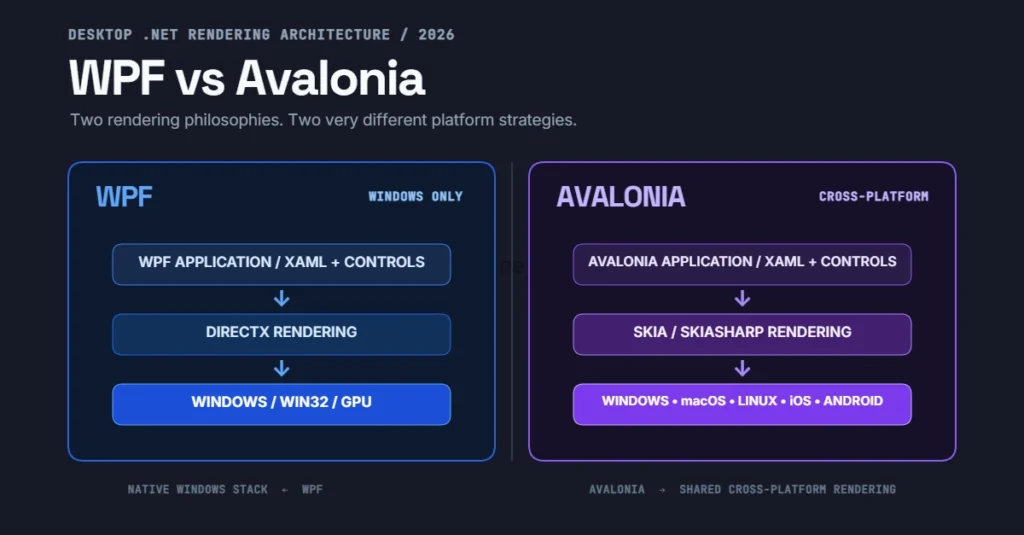
WPF draws its UI through DirectX via the Windows composition engine. It talks directly to native Win32 windows and leans on the OS for a lot of the heavy lifting — which is exactly why it’s fast on Windows and exactly why it can’t run anywhere else. Dependency properties, the visual tree, and the routed event system are all built assuming a single target OS.
Avalonia takes the opposite bet. Avalonia draws every pixel itself using SkiaSharp, with a newer composition renderer available since version 11.1, meaning the UI looks pixel-identical across every platform it runs on. It doesn’t ask the OS to draw a button — it paints the button itself and just asks the OS for a window and an input stream. That’s the entire reason Avalonia can run on Windows, macOS, Linux, iOS, Android, and WebAssembly from one codebase.
A typical implementation at this scale looks like a shared .axaml view layer with a platform-specific bootstrapper per target — desktop, mobile, browser — all pointing back at the same view models. Teams doing this in production report that roughly 80-90% of the ViewModel and binding logic carries over untouched; it’s the platform entry points and a handful of native-integration calls that need per-platform code.
xml
<!-- Avalonia AXAML — nearly identical to WPF XAML syntax -->
<Window xmlns="https://github.com/avaloniaui"
        xmlns:x="http://schemas.microsoft.com/winfx/2006/xaml"
        x:Class="InventoryApp.Views.MainWindow"
        Title="Inventory Dashboard" Width="900" Height="600">
    <Grid RowDefinitions="Auto,*">
        <TextBlock Grid.Row="0" Text="{Binding HeaderText}"
                   FontSize="20" Margin="12" />
        <DataGrid Grid.Row="1" ItemsSource="{Binding Items}"
                  IsReadOnly="True" AutoGenerateColumns="False">
            <DataGrid.Columns>
                <DataGridTextColumn Header="SKU" Binding="{Binding Sku}" />
                <DataGridTextColumn Header="Quantity" Binding="{Binding Quantity}" />
            </DataGrid.Columns>
        </DataGrid>
    </Grid>
</Window>
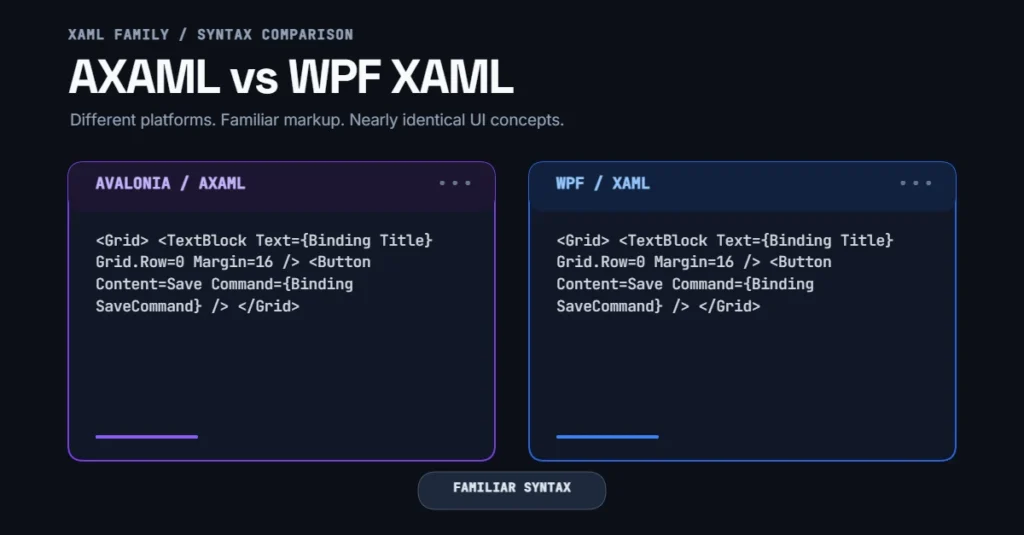
Compare that to the equivalent WPF markup and you’ll notice the binding syntax, the Grid row definitions, and the overall structure are nearly interchangeable. That’s deliberate, and it’s the single biggest reason migration conversations even happen.
xml
<!-- WPF equivalent — note how close the syntax stays -->
<Window x:Class="InventoryApp.MainWindow"
        xmlns="http://schemas.microsoft.com/winfx/2006/xaml/presentation"
        xmlns:x="http://schemas.microsoft.com/winfx/2006/xaml"
        Title="Inventory Dashboard" Width="900" Height="600">
    <Grid>
        <Grid.RowDefinitions>
            <RowDefinition Height="Auto"/>
            <RowDefinition Height="*"/>
        </Grid.RowDefinitions>
        <TextBlock Grid.Row="0" Text="{Binding HeaderText}"
                   FontSize="20" Margin="12"/>
        <DataGrid Grid.Row="1" ItemsSource="{Binding Items}"
                  AutoGenerateColumns="False" IsReadOnly="True">
            <DataGrid.Columns>
                <DataGridTextColumn Header="SKU" Binding="{Binding Sku}"/>
                <DataGridTextColumn Header="Quantity" Binding="{Binding Quantity}"/>
            </DataGrid.Columns>
        </DataGrid>
    </Grid>
</Window>
Performance: It’s Not as Simple as “Native Wins”
The instinctive assumption is that WPF, being native to Windows, must outperform a framework that draws its own pixels. That instinct isn’t wrong on raw startup time for small apps, but it doesn’t hold up once you get into data-heavy UIs with virtualization, custom controls, or GPU-bound rendering.
WPF vs Avalonia 2026 anyone who’s built a data-heavy WPF UI has hit the visual tree bottleneck — deep nested ItemsControl templates with converters on every binding start to choke the dispatcher thread once you cross a few thousand live elements. WPF’s UI thread affinity hasn’t changed, and it won’t; that architecture is baked in.
Avalonia’s Skia-based composition renderer, expanded significantly in the 11.x and 12.x line, handles large virtualized lists and custom-drawn controls with noticeably less jank in side-by-side testing, mostly because the rendering pipeline was built with GPU-accelerated compositing as a first-class concern rather than bolted on later. That said, WPF still wins on cold-start time for simple forms-based apps on Windows, because it isn’t bootstrapping a cross-platform rendering abstraction underneath a simple dialog box.
Cross-Platform Reach: The Deciding Factor for Most Teams
This is where the decision usually gets made, honestly. WPF runs on Windows. Full stop. There’s no port, no compatibility shim, no roadmap item that changes this — it’s tied to Win32 at a level that isn’t coming undone.
Avalonia’s pitch is the opposite: one codebase, several operating systems. Avalonia draws every pixel itself, meaning the UI looks identical across every platform it targets, and recent releases have pushed that story further into Linux-native territory. Avalonia 12.1 landed native Wayland support, graduating a backend that previously relied on Xwayland into a direct protocol implementation, along with rendering performance improvements. That’s a meaningful signal — Wayland support isn’t a checkbox feature, it’s core windowing infrastructure that took real engineering investment.
For teams that specifically need to keep an existing WPF investment while adding cross-platform reach without a full rewrite, there’s a middle path worth knowing about. Avalonia XPF is a commercial product built specifically to run existing WPF applications on non-Windows platforms with minimal code changes, and it continues to receive active updates addressing popup handling and window-drag behavior on non-Windows targets. It’s not free, and it’s not a drop-in for every app — but it exists precisely because “rewrite the whole UI layer” isn’t always realistic for a ten-year-old line-of-business app.
Tooling and Developer Experience
WPF’s tooling advantage used to be enormous — Visual Studio’s designer, Blend, and a decade of Stack Overflow answers. That gap has narrowed considerably. Avalonia now ships its own dedicated Visual Studio extension, and it’s not a token effort. The latest Avalonia for Visual Studio release added full support for Avalonia’s v12 templates, a detachable preview window that can be repositioned independently of the editor, new color schemes, and web-based sign-in. A follow-up update added Toolbox and Document Outline support for the Complete edition along with a batch of fixes.
That’s a real design-time experience now, not a bare-bones XAML text editor with no preview. It still doesn’t fully match the depth of WPF’s mature designer surface for complex data templates, but the distance has shrunk faster than most people expected.
Hot reload works reliably on both frameworks in current tooling. Where they diverge is debugging platform-specific rendering issues — WPF debugging stays entirely within familiar Windows tooling, while Avalonia occasionally requires understanding the Skia rendering layer when something looks subtly off on one platform but not another.
Migration Reality: What It Actually Takes
WPF vs Avalonia 2026 if teams considering a WPF-to-Avalonia move should walk in with realistic expectations, not marketing-page optimism. The XAML syntax and INotifyPropertyChanged-based binding model transfer well. Commanding via ICommand works nearly identically. Where teams hit friction:
- Custom controls with heavy
Adornerusage — WPF’s adorner layer has no direct Avalonia equivalent and needs a rethink BitmapEffectand legacyEffectclasses — largely obsolete territory that needs replacing regardless of target framework- Win32 interop calls (
HwndSource, P/Invoke into user32.dll) — these need platform-conditional code or removal - Third-party WPF control libraries — most commercial vendors (Telerik, DevExpress, Syncfusion) now ship Avalonia equivalents, but licensing and API surface differ enough to require real testing time
Microsoft has also leaned into AI-assisted migration tooling for WPF itself, which matters even for teams not moving to Avalonia at all. Visual Studio 2026 and recent Visual Studio 2022 builds include a Modernize feature accessible by right-clicking a solution or project, or by invoking GitHub Copilot Chat with an @Modernize command. That’s aimed at .NET Framework-to-.NET Core upgrades rather than cross-framework UI ports, but it’s worth knowing about if your WPF app is still stuck pre-.NET Core.
Who Should Pick What in 2026
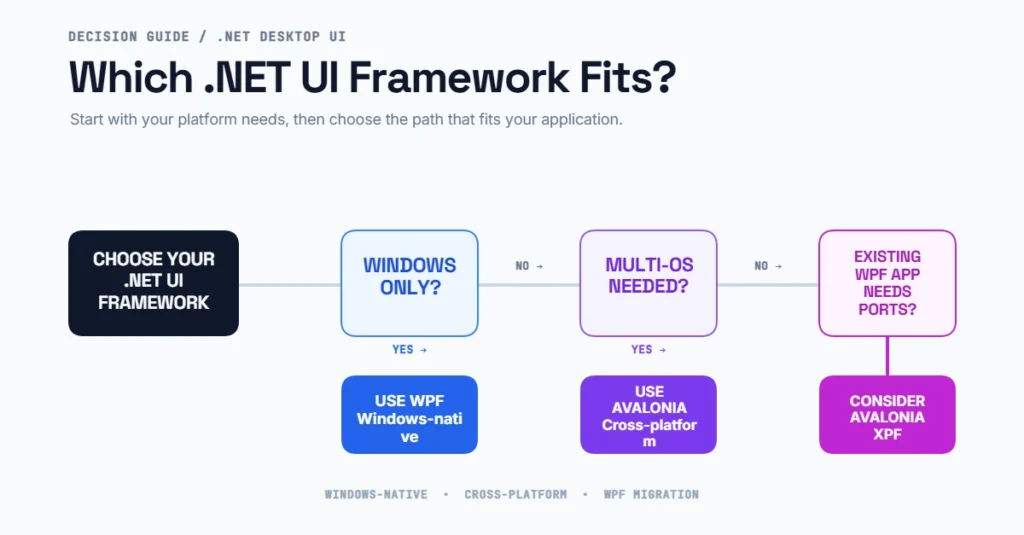
Stick with WPF if: your app is Windows-only by business requirement, you have a large existing WPF codebase with deep Adorner or Win32 interop usage, or your team’s primary constraint is minimizing risk on a stable, funded, LTS-backed platform. A stay-on-WPF path through .NET 10 LTS is fully supported through November 2028, so there’s no urgency driven by end-of-life pressure.
Move to Avalonia if: you need genuine multi-OS reach — Windows, macOS, Linux, and increasingly mobile and browser targets — from one codebase, your team already thinks in XAML and MVVM, or you’re starting a new desktop product where locking into Windows-only from day one would be a strategic mistake. Engineering teams building net-new internal tools or SaaS-adjacent desktop clients are the group leaning into Avalonia fastest, largely because there’s no legacy Win32 baggage to work around.
Consider Avalonia XPF if: you have a large, mature WPF app and need cross-platform reach without a UI rewrite. It’s a paid path, but it exists for exactly this scenario and continues to see active maintenance.
Neither framework is objectively “better” in the abstract sense — that framing misses the point entirely. WPF vs Avalonia 2026 is really a question of platform reach versus platform depth, and the right call depends entirely on what your app actually needs to run on three years from now.
Conclusion
The WPF vs Avalonia 2026 conversation isn’t about picking a winner — it’s about matching architecture to actual deployment targets. WPF remains a stable, well-supported, Windows-native choice with real staying power through 2028 and beyond. Avalonia has matured into a legitimate cross-platform alternative with serious adoption numbers, better tooling than it had two years ago, and a rendering engine built for the multi-OS world from day one. Teams that get this decision right are the ones being honest about where their users actually run the app, not the ones chasing whichever framework has the louder conference talk this year.
A note on freshness: WPF vs Avalonia 2026 Desktop UI frameworks and their tooling ecosystems continue shifting quickly through 2026 — version numbers, platform support, and migration tooling referenced here reflect information verified as of the article’s publish date, and teams should confirm current release status before committing to a migration plan.
FAQs
Is Avalonia a full replacement for WPF?
Not universally. It replaces WPF well for teams needing cross-platform reach, but WPF still has a deeper native Windows designer experience and a decade more of third-party control maturity on that single platform.
Can I run an existing WPF app on macOS without rewriting it?
Not directly through open-source Avalonia — that still requires porting the XAML and addressing Win32-specific code. Avalonia XPF is built specifically for this scenario as a commercial product with less rewrite overhead.
Does Avalonia support mobile and browser targets in 2026?
Yes. Avalonia targets iOS, Android, and WebAssembly alongside desktop platforms, though desktop remains the most mature and widely deployed target.
In fight of WPF vs Avalonia 2026 Is WPF being deprecated?
No. Microsoft continues shipping WPF updates, and the stay-on-WPF path is supported through .NET 10 LTS until November 2028. It’s in mature maintenance mode, not deprecation.
Which framework has better performance for data-heavy UIs?
Avalonia’s Skia-based composition renderer tends to handle large virtualized data sets with less UI-thread jank, while WPF still wins on cold-start time for simple, non-virtualized forms apps on Windows.